If you’ve searched for AI tools recently, you’ve probably seen long lists promising faster results, better content, and easier success.
For beginners, those lists often create more confusion than clarity.
The truth is simpler: you don’t need many tools. You only need a small, thoughtful setup that supports learning instead of overwhelming it.
This guide explains which AI tools are actually useful for beginners, which ones you can safely ignore for now, and how to choose tools without regret.
You Don’t Need Every Tool
AI tools are meant to support your thinking — not replace it.
Using more tools does not automatically lead to:
-
Better content
-
Faster progress
-
Better results
In fact, starting with too many tools often slows beginners down.
A simple setup makes it easier to learn, write, and stay consistent.
If you prefer watching instead of reading, this short video explains the same idea visually. You don’t need to watch it to continue.
How to Think About AI Tools as a Beginner
Before choosing tools, it helps to reset expectations.
AI tools:
-
Help organize ideas
-
Reduce friction when writing
-
Support clarity and structure
They do not:
-
Think for you
-
Replace understanding
-
Guarantee outcomes
If a tool makes writing feel clearer and calmer, it’s probably helping.
If it adds noise or pressure, it’s okay to skip it.
The Only Three AI Tool Categories That Matter
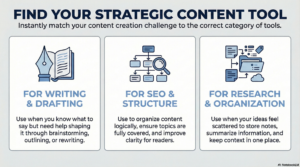
Most beginner-friendly tools fit into just three categories. You don’t need more than this at the start.
Writing & Drafting Support
These tools help with:
-
Brainstorming ideas
-
Creating outlines
-
Drafting and rewriting content
They’re useful when you know what you want to say, but need help shaping it.
SEO & Content Structure Support
These tools help with:
-
Organizing content logically
-
Making sure topics are fully covered
-
Improving clarity for readers
They support learning — they don’t replace it.
Research & Organization
These tools help with:
-
Storing notes and sources
-
Summarizing information
-
Keeping context in one place
They’re especially helpful if your ideas feel scattered.
Three AI Tools Beginners Can Start With
These aren’t “best overall” tools.
They’re beginner-friendly starting points that match the categories above.
You don’t need to use all three.
ChatGPT — Thinking & Writing Support
ChatGPT works best as a thinking partner.
It can help with:
-
Brainstorming ideas
-
Creating outlines
-
Rewriting sentences for clarity
Important limitation:
It needs clear direction and human editing. Anything it produces should be reviewed and rewritten in your own words.
SEOWriting.ai — Structure & SEO Support
SEOWriting.ai is useful for SEO-aware drafts.
It can help with:
-
Structuring blog posts
-
Covering important subtopics
-
Drafting organized content
Important limitation:
Drafts should never be published without editing. Treat it as a structured starting point, not a finished article.
NotebookLM — Research & Organization
NotebookLM is best used as a content memory.
It’s helpful for:
-
Organizing notes and sources
-
Summarizing reference material
-
Keeping context together
Important limitation:
It’s not designed for writing posts. Think of it as a research companion.
Tools Beginners Often Don’t Need Yet
Some tools are better saved for later.
As a beginner, you can safely ignore:
-
Automation-heavy tools
-
Expensive all-in-one platforms
-
Tools promising instant results
Learning the basics matters more than trying to automate too early.
A Simple Beginner AI Tool Setup
A calm starting setup looks like this:
-
1 thinking or writing tool
-
1 drafting or structure tool
-
1 organization tool
That’s enough to begin.
You can always add more later — when you know what you actually need.
How to Choose Tools Without Regret
To avoid tool fatigue:
-
Start with one tool
-
Use it for one specific task
-
Notice how it feels to use
-
Keep what helps
-
Ignore everything else
You don’t need to justify your choices. If a tool supports your workflow, it’s doing its job.
What to Do Next
If you’re new to AI tools:
-
Choose one tool to try
-
Use it for a single task (like outlining)
-
Edit everything yourself
-
Keep your voice in control
Simple steps work better than complex systems.
Final Thought
AI tools don’t make content good or bad.
Clarity does.
Honesty does.
Consistency does.
If a tool helps you write more clearly — without changing how you sound — you’re using it the right way.