Starting a blog can feel intimidating — especially when everyone seems to be talking about AI.
Some people say AI will do everything for you.
Others warn that it will ruin your writing or get you penalized.
The truth is much simpler.
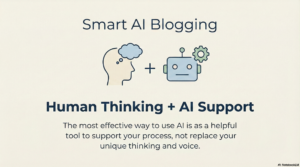
AI can be helpful for blogging if you use it as support, not as a replacement for your thinking or your voice.
This guide explains how beginners can use AI calmly and responsibly — without sounding fake, rushed, or overwhelmed.
If you prefer watching instead of reading, this short video explains the same idea visually. You don’t need to watch it to continue.
What AI Is Actually Good At (And Why That Matters)
AI works best when it helps with the harder mental parts of writing.
It can help you:
-
Brainstorm ideas when your mind feels stuck
-
Organize thoughts into a clear structure
-
Create rough drafts you can improve
-
Rewrite sentences to be clearer
What it doesn’t do well is:
-
Think for you
-
Share real experience
-
Understand your audience the way you do
When you see AI as a thinking assistant, not a writer, everything becomes easier.
What AI Should Not Be Used For
This part matters, especially for beginners.
AI should not be used to:
-
Publish content without editing
-
Pretend you know things you don’t
-
Copy other people’s ideas
-
Replace learning with shortcuts
If something doesn’t sound like you, it shouldn’t be published — no matter how polished it looks.
Your judgment still matters more than any tool.
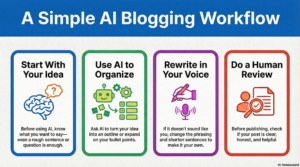
A Simple AI Blogging Workflow (Beginner-Safe)
You don’t need a complicated system.
A simple process works best.
1. Start With Your Own Idea
Before using AI, know what you want to say — even roughly.
A sentence, a question, or a short note is enough.
2. Use AI to Organize or Expand
Ask AI to:
-
Turn your idea into an outline
-
Expand bullet points
-
Suggest clearer explanations
This saves mental energy, not creativity.
3. Rewrite in Your Own Words
This is where your voice stays intact.
-
Shorten sentences
-
Change phrasing
-
Add reassurance
-
Remove anything that feels exaggerated
If it doesn’t sound like something you’d say, rewrite it.
4. Do a Human Review
Before publishing, ask yourself:
-
Is this clear?
-
Is this honest?
-
Would this help a beginner feel calmer?
If yes — you’re done.
Will Using AI Hurt Your Blog?
This is a common worry.
What matters most is helpfulness, not how the content was created.
Search engines and readers care about:
-
Clear explanations
-
Original structure
-
Honest intent
-
Real usefulness
If your content helps someone understand something better, you’re on the right track.
Where Tools Fit (And Where They Don’t)
AI tools are there to support your process — not define it.
They help with:
-
Clarity
-
Speed
-
Organization
They don’t:
-
Replace your perspective
-
Guarantee results
-
Do the work for you
Think of tools as optional helpers.
Your voice is the foundation.
What to Do Next
If you’re new to AI blogging, keep it simple:
-
Use AI for one small task (like outlining)
-
Edit everything yourself
-
Focus on clarity, not volume
You don’t need to use every feature or tool to make progress.
Final Thought
AI doesn’t make a blog good or bad.
Clarity does.
Honesty does.
Consistency does.
If your writing sounds like you — and helps someone understand something a little better — you’re using AI the right way.
You don’t need to rush.
You don’t need to scale.
You just need to keep learning and improving one step at a time.